How to Rank Locally on Google: A Complete Guide for Business Growth
How to Rank Locally on Google: A Complete Guide for Business Growth
Written by
Soumil Jain
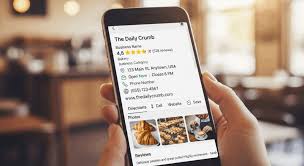
Local SEO is the process of optimizing your online presence to appear in location-based search results, such as “near me” or “best services in [city].”
In this post:
In this post:
Section
Local SEO has become essential for businesses looking to attract nearby customers. Whether you run a retail store, agency, or service-based business, learning how to rank locally on Google can significantly boost your visibility and revenue.
What is Local SEO?
Local SEO is the process of optimizing your online presence to appear in location-based search results, such as “near me” or “best services in [city].”
Why Local Ranking Matters
Increases visibility in your target area
Drives high-intent traffic
Improves footfall and conversions
Builds trust with local customers
Key Strategies to Rank Locally on Google
1. Optimize Your Google Business Profile
Your Google Business Profile (GBP) is the foundation of local SEO. Make sure you:
Complete all business details (name, address, phone number)
Add high-quality images
Select relevant categories
Post updates regularly
2. Use Local Keywords
Include location-based keywords like:
“Digital marketing agency in Delhi”
“Best retail consultants near me”
Use these in:
Website content
Meta tags
Headings
3. Build Local Citations
List your business on directories such as:
Justdial
IndiaMART
Sulekha
Ensure consistent NAP (Name, Address, Phone Number) across all platforms.
4. Get Customer Reviews
Reviews are a major ranking factor. Encourage satisfied customers to leave positive reviews and always respond to them.
5. Optimize for Mobile
Most local searches happen on mobile devices. Ensure your website:
Loads fast
Is mobile-friendly
Has easy navigation
6. Create Local Content
Write blogs or landing pages targeting local audiences. Example:
“Top digital marketing services in Delhi”
7. Build Local Backlinks
Get links from local websites, blogs, and news platforms to improve authority.
8. Use Schema Markup
Add local business schema to your website to help search engines understand your business better.
Common Mistakes to Avoid
Inconsistent business information
Ignoring reviews
Keyword stuffing
Not updating your Google Business Profile
Benefits of Ranking Locally
Higher visibility in search results
Increased leads and sales
Strong local brand presence
FAQs
Q1. How long does it take to rank locally on Google?
It can take 3–6 months depending on competition and optimization efforts.
Q2. Is Google Business Profile free?
Yes, it’s completely free and essential for local SEO.
Q3. How important are reviews for local ranking?
Very important - they influence both rankings and customer trust.
Q4. Can small businesses rank locally?
Yes, with proper optimization and consistent efforts, small businesses can rank effectively.
Want to dominate local search results? Soumil Jain helps businesses rank higher on Google with proven local SEO strategies. Contact us today to boost your local visibility and drive more customers!
Local SEO has become essential for businesses looking to attract nearby customers. Whether you run a retail store, agency, or service-based business, learning how to rank locally on Google can significantly boost your visibility and revenue.
What is Local SEO?
Local SEO is the process of optimizing your online presence to appear in location-based search results, such as “near me” or “best services in [city].”
Why Local Ranking Matters
Increases visibility in your target area
Drives high-intent traffic
Improves footfall and conversions
Builds trust with local customers
Key Strategies to Rank Locally on Google
1. Optimize Your Google Business Profile
Your Google Business Profile (GBP) is the foundation of local SEO. Make sure you:
Complete all business details (name, address, phone number)
Add high-quality images
Select relevant categories
Post updates regularly
2. Use Local Keywords
Include location-based keywords like:
“Digital marketing agency in Delhi”
“Best retail consultants near me”
Use these in:
Website content
Meta tags
Headings
3. Build Local Citations
List your business on directories such as:
Justdial
IndiaMART
Sulekha
Ensure consistent NAP (Name, Address, Phone Number) across all platforms.
4. Get Customer Reviews
Reviews are a major ranking factor. Encourage satisfied customers to leave positive reviews and always respond to them.
5. Optimize for Mobile
Most local searches happen on mobile devices. Ensure your website:
Loads fast
Is mobile-friendly
Has easy navigation
6. Create Local Content
Write blogs or landing pages targeting local audiences. Example:
“Top digital marketing services in Delhi”
7. Build Local Backlinks
Get links from local websites, blogs, and news platforms to improve authority.
8. Use Schema Markup
Add local business schema to your website to help search engines understand your business better.
Common Mistakes to Avoid
Inconsistent business information
Ignoring reviews
Keyword stuffing
Not updating your Google Business Profile
Benefits of Ranking Locally
Higher visibility in search results
Increased leads and sales
Strong local brand presence
FAQs
Q1. How long does it take to rank locally on Google?
It can take 3–6 months depending on competition and optimization efforts.
Q2. Is Google Business Profile free?
Yes, it’s completely free and essential for local SEO.
Q3. How important are reviews for local ranking?
Very important - they influence both rankings and customer trust.
Q4. Can small businesses rank locally?
Yes, with proper optimization and consistent efforts, small businesses can rank effectively.
Want to dominate local search results? Soumil Jain helps businesses rank higher on Google with proven local SEO strategies. Contact us today to boost your local visibility and drive more customers!